
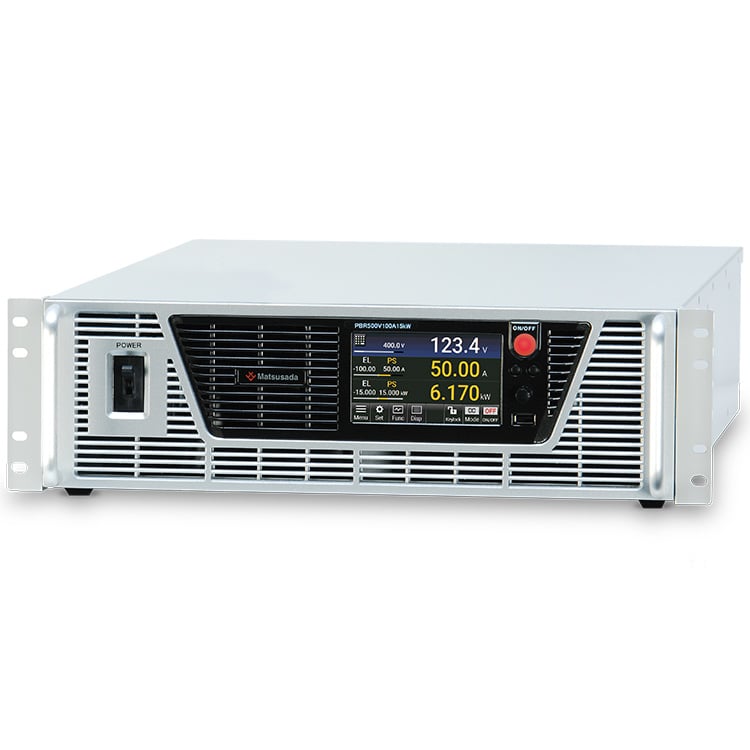
BIDIRECTIONAL DC POWER SUPPLY
Regenerative DC Electronic Load
- Voltage range:
80 to 1500 V - Current:
20 to 360 A - Power:
5 kW, 10 kW, and 15 kW - DC power supply
⇔ Electronic load
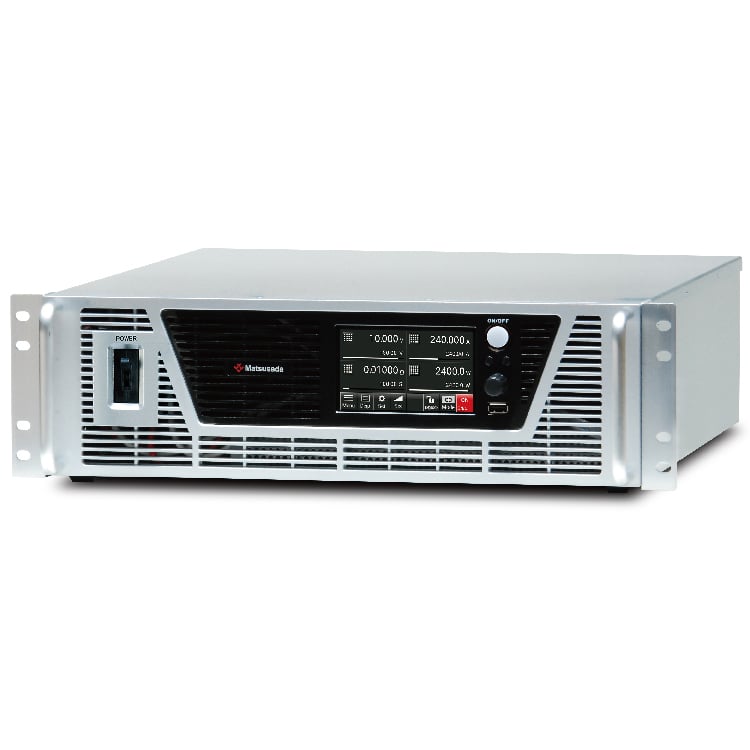
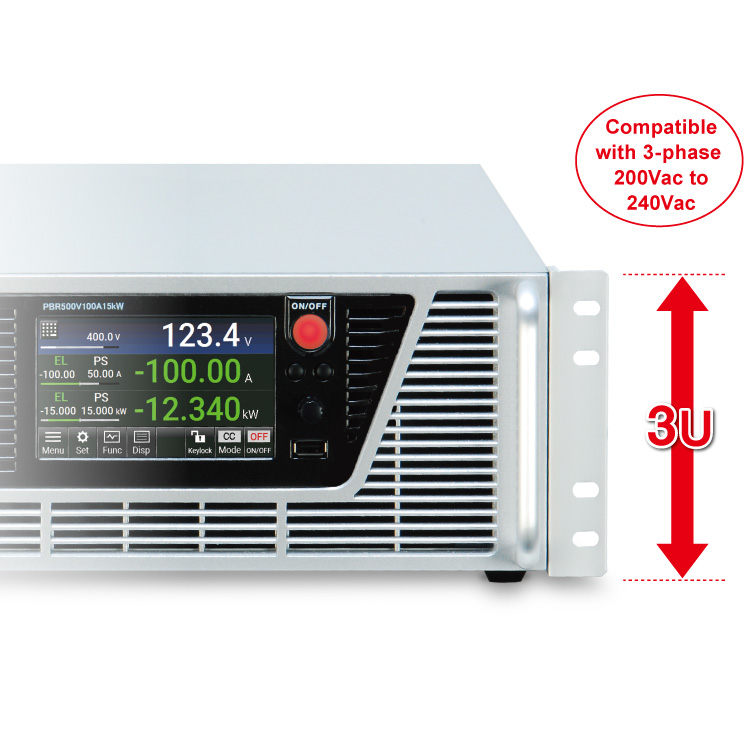
High-Power Density in a Compact 3U Form Factor: Up to 15 kW Output with 200-240 VAC Input
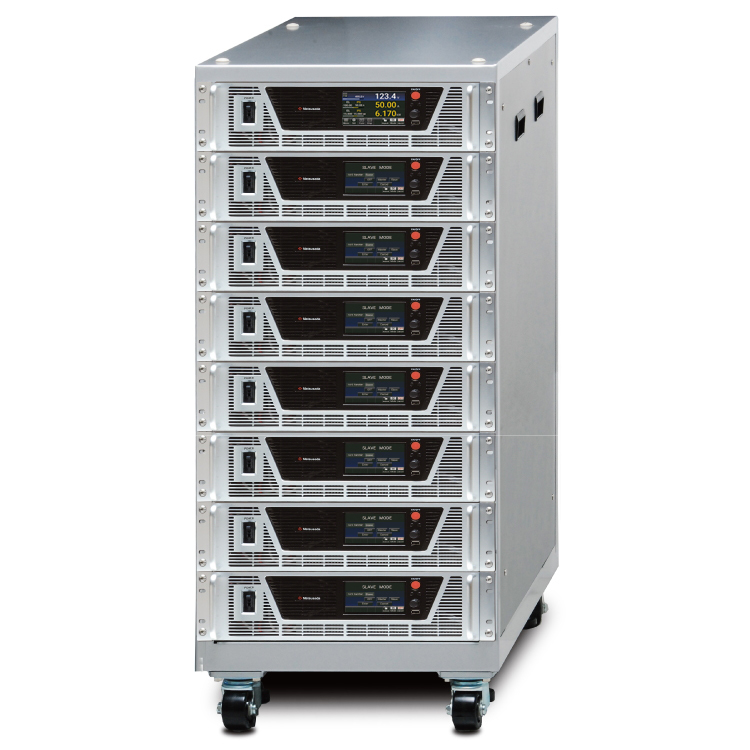
The PBR series is a high-power bidirectional DC power supply designed to maximize efficiency and minimize heat generation. By regenerating load power back to the AC grid instead of dissipating it as heat, the PBR series significantly improves energy efficiency compared to conventional electronic loads. Featuring Matsusada Precision's proprietary high-density packaging and optimized airflow design, the series delivers up to 15 kW in a compact 3U chassis, making it ideal for space-constrained industrial and research environments. The PBR series can be used as a single DC power supply or DC electronic load up to 15 kW. Furthermore, it is available in parallel operation of up to 150 kW (by ten units).
What is a bidirectional power supply?
A bidirectional power supply (regenerative DC power supply) is a power supply that functions as both a DC power supply and a DC electronic load in a single unit and regenerates power to the AC power source side during the electronic load operation. It is also known as a regenerative power supply, regenerative electronic load, or bidirectional power supply. The power supply is suitable for various applications, including evaluating inverters, DC-DC converters, and motors, as well as other tests, without requiring connection switching.
We recognize the importance of renewable energy for sustainable development, diversification of energy supply, and preservation of the environment, considering rapidly changing international situations. To address critical issues such as the energy crisis and climate change, carbon-neutral and carbon-offset initiatives to reduce greenhouse gas emissions are underway. The use of renewable energy sources such as solar power, wind power, and green hydrogen is also promoted. The development and spread of environmentally friendly technologies such as electrified electric vehicles with the power train system, household storage batteries, and fuel cells have been accelerated.
In response to the social conditions, the PBR series of regenerative DC power supplies regenerates power to use energy effectively, contributing to developing and evaluating inverters, converters, and other devices.
APPLICATIONS
In accordance with the strategy, the development of innovative energy sources along with new battery research and development that do not emit CO2 is further accelerated. It will coincide with the shift from vehicles having internal combustion engines to Hybrid Electric Vehicles (HEV), Plug-in Hybrid Electric Vehicles (PHEV), Electric Vehicles(EV), and Fuel Cell Vehicles (FCV). And, motorcycles are also converted to EV bikes. That is, the PBR/PBRM series, a regenerative power supply with its compact and high-power solutions, can support various development, evaluation, and shipment inspection applications. Experience the benefits of the PBR series in your application.
Bidirectional DC-DC converter evaluation
Using two PBRs eliminates troublesome operations like wiring changes and other setups common with conventional power supply and electronic load combinations. Power consumption is significantly reduced by operating one unit in source mode and the other in sink (regenerative) mode.

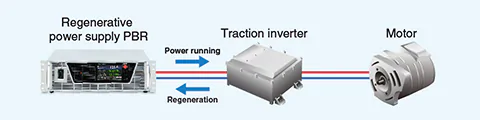
Traction inverter/Motor evaluation
A single unit can sink counter-electromotive current from motors and inverters. This application requires a bidirectional DC power supply capable of both sourcing and sinking power to simulate a battery effectively.
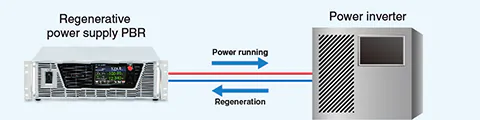
Power inverter evaluation for battery system
Power inverter evaluation is available using a regenerative DC power supply for the battery simulation. MBS: the battery simulation function and -LAsoc option: SOC makes it easy to perform the evaluation.
High Voltage Battery Charge/discharge testing
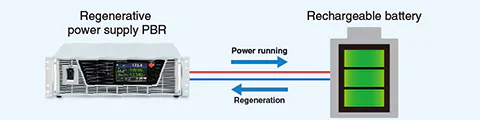
A single unit can perform charge and discharge operations, reducing the setup time compared to conventional power supply and electronic load combinations. Dedicated software (PBR-BT) is also available, streamlining software development. The PBR/PBRM can perform charge/discharge cycle tests on high-voltage batteries up to 1500V.
[Cautions for Battery Connection]
Always turn OFF the product output before connecting a battery to prevent inrush current damage to the unit or the load. Note: The PBR series is equipped with a built-in fuse rated for its maximum output current. To ensure safety in the event of a fault, we strongly recommend installing an external fuse or protection circuit matched to the actual operating current of your specific application, especially when testing smaller capacity batteries.
Other
- V2H (Vehicle to Home) system evaluation
- OBC (On-Board Charger)
- Development and evaluation of inverters
- DC motor testing
- Electric Vehicle (EV)
- Battery Energy Storage System (BESS) Testing
FEATURES
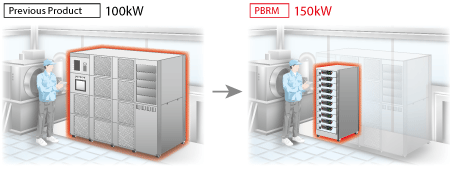
1. SPACE-SAVING DESIGN FOR WORKPLACE
Introducing the extremely compact PBR/PBRM makes more effective use of your workspace. We have developed the smaller regeneration DC power supply for space saving aimed at installing other measuring tools, which makes effective use of the space at the workplace.
2. COMPACT SOLUTION
- State-of-the-art semiconductor
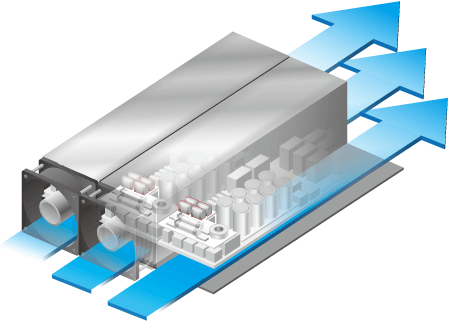
- To minimize internal heat generation, we adopted the latest high-efficiency semiconductor elements after thorough examination. This enables the product to provide such as a sufficient cooling function to maximize high performance.
- High-Efficiency Thermal Design
- Previously, high-power supplies required significant internal volume for heat dissipation. The PBR series overcomes this limitation with an optimized internal layout that eliminates dead space and improves airflow. This high-density mounting technology allows for a 15 kW unit to fit within a standard 3U height (133 mm / 5.24 in), saving valuable rack space without compromising performance.
3. EXTENSIVE MODELS FOR VARIOUS APPLICATIONS
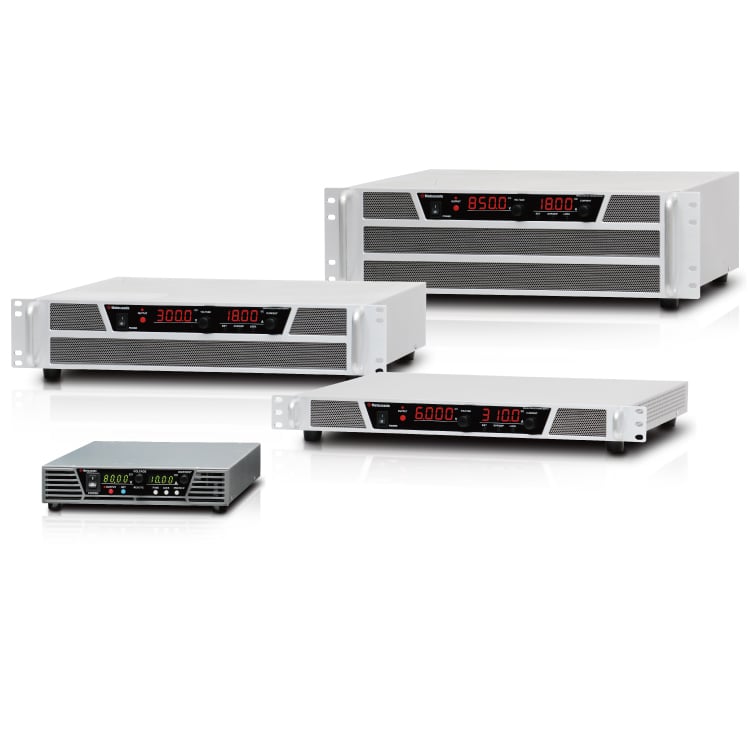
The PBR/PBRM series offers a wide range of DC power supply models, from 5 kW to 150 kW, with over 60 models available. The series allows you to find the best-fit model for your applications.

Models
More Models will be added at any time.
| Model | Power running or Regeneration at Maximum | ||
|---|---|---|---|
| Voltage [Vdc] | Current | Power | |
| PBR80V120A5kW | 80 Vdc | 120 A | 5 kW |
| PBR80V240A10kW | 240 A | 10 kW | |
| PBR80V360A15kW | 360 A | 15 kW | |
| PBR120V90A5kW | 120 Vdc | 90 A | 5 kW |
| PBR120V180A10kW | 180 A | 10 kW | |
| PBR120V270A15kW | 270 A | 15 kW | |
| PBR200V70A5kW | 200 Vdc | 70 A | 5 kW |
| PBR200V140A10kW | 140 A | 10 kW | |
| PBR200V210A15kW | 210 A | 15 kW | |
| PBR500V33A5kW | 500 Vdc | 33 A | 5 kW |
| PBR500V66A10kW | 66 A | 10 kW | |
| PBR500V100A15kW | 100 A | 15 kW | |
| PBR600V71A15kW | 600 Vdc | 71 A | 15 kW |
| PBR850V36A5kW | 850 Vdc | 36 A | 5 kW |
| PBR850V45A10kW | 45 A | 10 kW | |
| PBR850V53A15kW | 53 A | 15 kW | |
| PBR1500V20A5kW | 1500 Vdc | 20 A | 5 kW |
| PBR1500V25A10kW | 25 A | 10 kW | |
| PBR1500V30A15kW | 30 A | 15 kW | |
* The device is designed on the assumption that all regenerated power will be consumed on the premises.
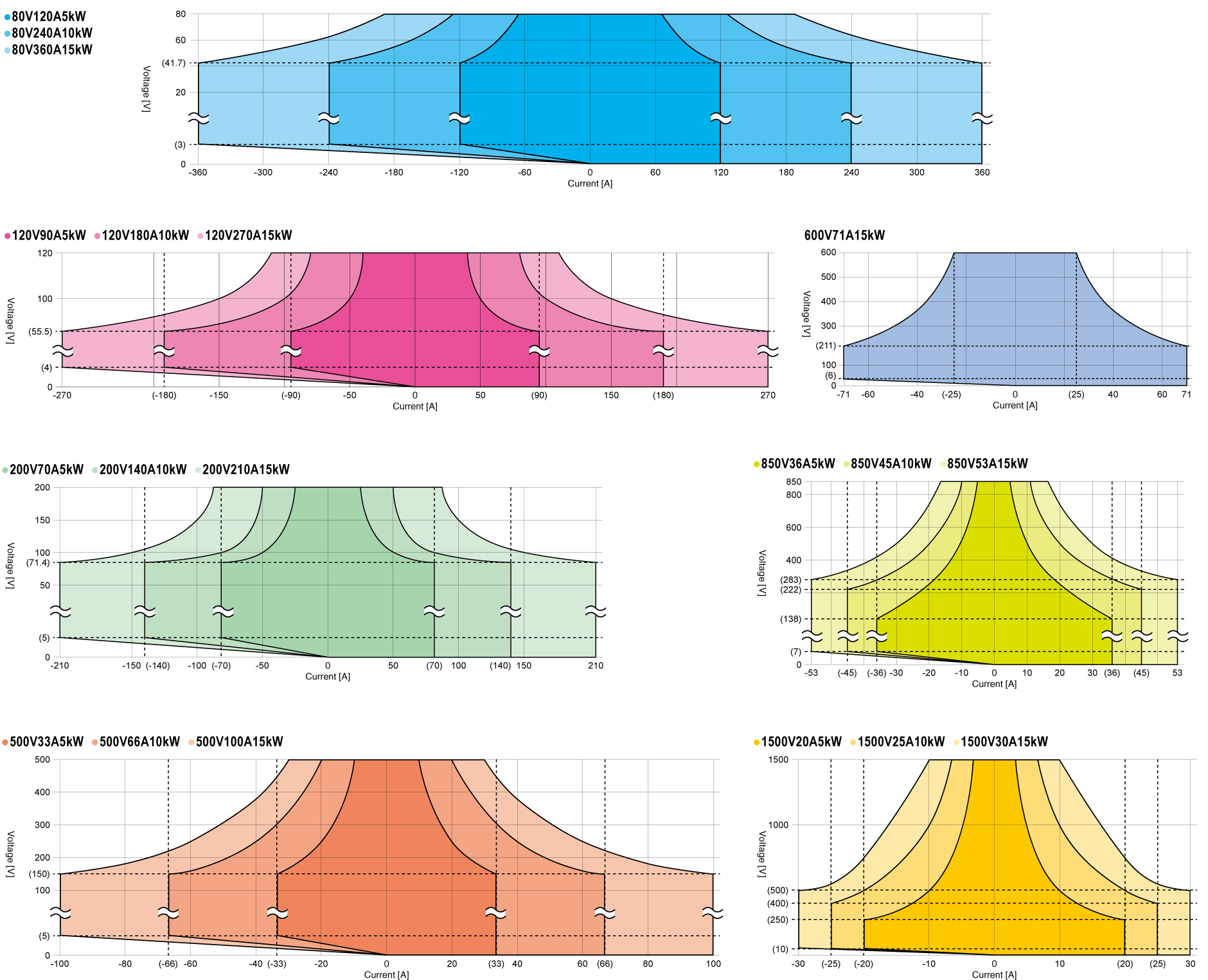
* Regenerative operation has a lower limit of voltage/current. Refer to the figures below. Contact us, for details.
Operational Range
Functions
Advanced Features with Front USB Port
No data logger or no always connected computer required
Shortening the time of wiring and preparation, Suited for cycle tests in areas where computers are prohibited.
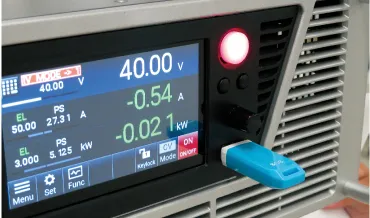
- Features:Built-in data logging
- Data logging captures the output data at the fastest interval of 0.1 seconds by inserting the USB memory stick. You can also use the included application (Matsusada Log Viewer: MLV) to view log data and output it in CSV format.
- Use in places where you cannot always connect a computer
- With the attached application (Matsusada Sequence Software: MSS), you can save the sequence program data to the USB memory and load it from the front USB port. Thus, program operation is possible only with the power supply unit.
Application Package (Attached)
Three types of application software are included as standard. Data can be linked using the front USB port.
⑴ Test Sequence function: MSS (Matsusada test Sequence Software)
Easy to use for beginners
Matsusada Sequence Software (MSS) enables you to create sequence programs simply by setting parameters, even if you have no programming knowledge.
The software makes it easier and more convenient to create a test sequence program. The created sequence data can be saved to USB memory, and up to 1,024 steps of the sequence program can be loaded.

⑵ MLV (Matsusada Log Viewer): Graphical display of operation logs
Quickly display operation logs in graphs
Using the Matsusada Log Viewer (MLV), you can read log files saved on USB memory, etc., and quickly display them in graphs. This allows you to easily find abnormalities during operation.
CSV file export for operation log data
You can also select export items from the operation log and save them in CSV format. Then, you can load the CSV log data in a spreadsheet to help you create reports.
- Elapsed time
- CC/CV mode
- Output value (voltage, current, and power)
- Status
- Error information
The operation logging function is possible during sequence program operation, local control, and remote control. A USB memory is required to save the operation log.

⑶ Battery simulator: MBS (Matsusada Battery Simulator)
Easy setting of battery operation with graphs
MBS can readily perform simulations of the I-V characteristic curve for the battery. And, the voltage/current can be set up to 1001 within the rated voltage/current values, enabling a more linear characteristic simulation.
Patterns created by the dedicated software can be saved in the USB memory and loaded from the front USB port.
You can perform intuitively by entering numerical values while looking at the graph, or directly dragging the graph to make settings.
The PBR/PBRM series can simulate high-voltage batteries up to 1500V.

SOC Automated Variable System (Option): -LAsoc

Calculating the battery charge rate and automatically switching the I-V curve
This can help smoothly perform an evaluation of objects according to changes in the charge rate.
The software calculates the battery charge rate (%) from the power running as well as regenerative operation times and current values, and automatically switches the created I-V curve. SOC will fall at a power running operation and will rise at a regenerative operation. In addition, up to 100 graph patterns can be generated.
Remote Control Software (Additional Accessories): DigiCon Series
DigiCon is an application software that remotely controls Matsusada Precision's DC power supplies connected via LAN
The software can control multiple power supplies simultaneously or individually.
- Power control for PRKT, PRT/PRTM, PBR/PBRM, P4KF, PKTS, HARS series
- Full remote control available
- Consists of "configuration software" and "operation software
- Linkage to digital multimeters, data loggers, and thermostatic chambers is possible.
- Easy operation with Graphical User Interface (GUI)
- Automatic Test Equipment (ATE) can be built without programming knowledge.
- Real-time logging, graphing, and data storage
Link with digital multimeters, data loggers, and thermostatic chambers is possible.
Program transitions can be made in response to external conditions by linking with measuring instruments such as digital multimeters and data loggers, as well as thermostatic chambers.
This advanced function allows the program to transition to the next step when the end condition of the instrument is met without waiting for a set time, or to safely terminate the program if a problem occurs during operation.
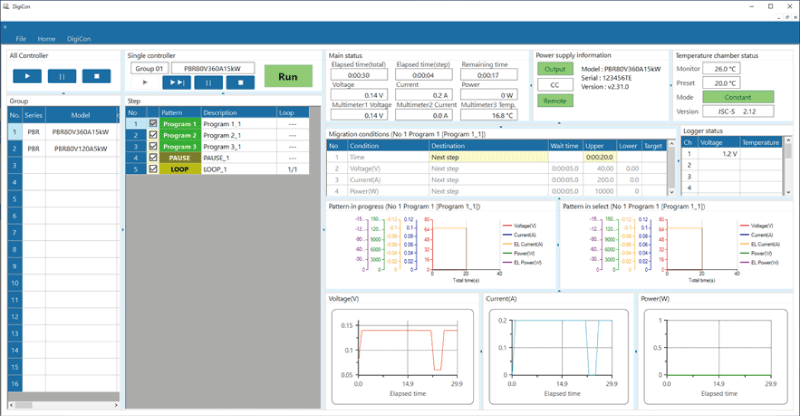
Easy operation enables speedy construction of Automatic Test Equipment (ATE)
Graphical user interface, including graphical display of set values, allows easy operation.
Automatic Test Equipment (ATE) and inspection systems can be built without programming knowledge.
It can be used in many fields and applications, such as long-term reliability testing of electronic equipment and devices in the automotive, home appliance, and medical fields.
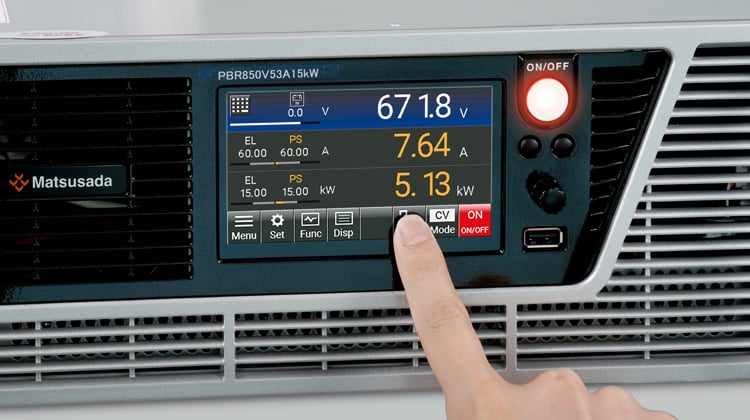
Large Color Touch Panel Screen
PBR/PBRM series comes with a large color touch panel, realizing its operability and visibility improvement.
- Easy setting of output voltage, current, power, and other parameters!
- Simple setting to complex sequence program!
- New feature with more selectable error detections!
- Quick check of the power running/regeneration operation mode with colorful display
- Equally available in a conventional configuration with the setting dial
Automated Test Function
The automated test function allows the programming of parameters such as step time, step amplitude, ramp, CV/CC mode, sequence end setting, step jump, and jump count by simply operating on the front panel. This option enables to generate optional waveforms, and you can use a great variety of applications including testing evaluation, and verification.
You can create the sequence data using our attached software
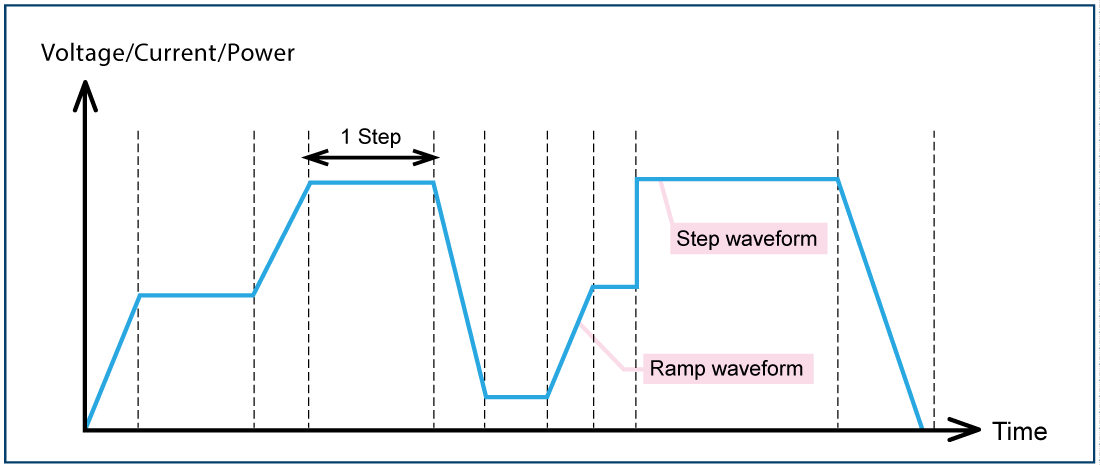
- Step setting time 0.0 to 3,600 s
- For one program, a maximum of 1,024 steps can be configured and saved.
- CV/CC mode can be set for each program.
- Repetition frequency: infinity, or 1 to 999 Program as Image
CV/CC Priority Setting Function
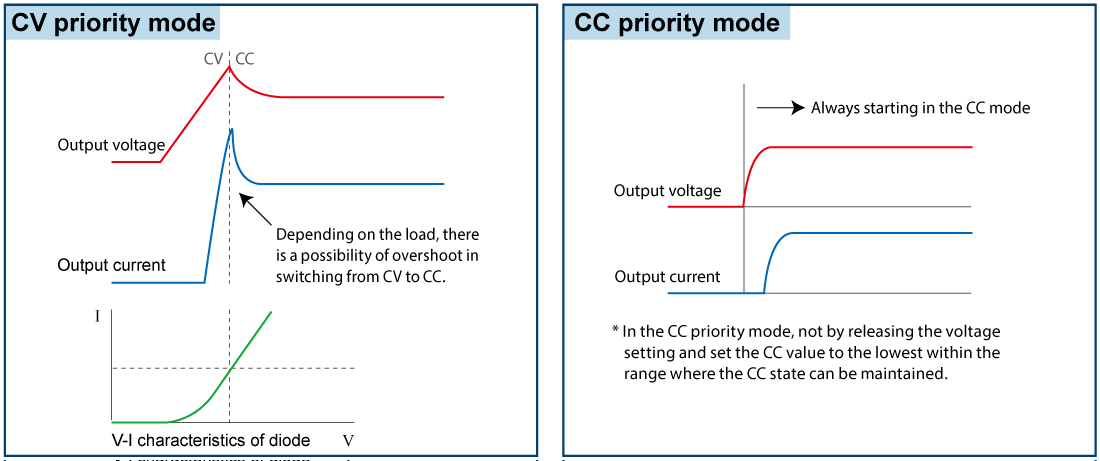
CV (Constant Voltage) priority/CC (Constant Current) priority mode can be selected and set. As is the case with diodes, a load tends to suddenly change the resistance at certain points. When the device is started in CV mode, the current will be a momentary overshot. In the PBR series, select the CC priority mode to suppress the occurrence of overshoot. The function can reduce the risk of damaging expensive loads such as high-power laser diodes.
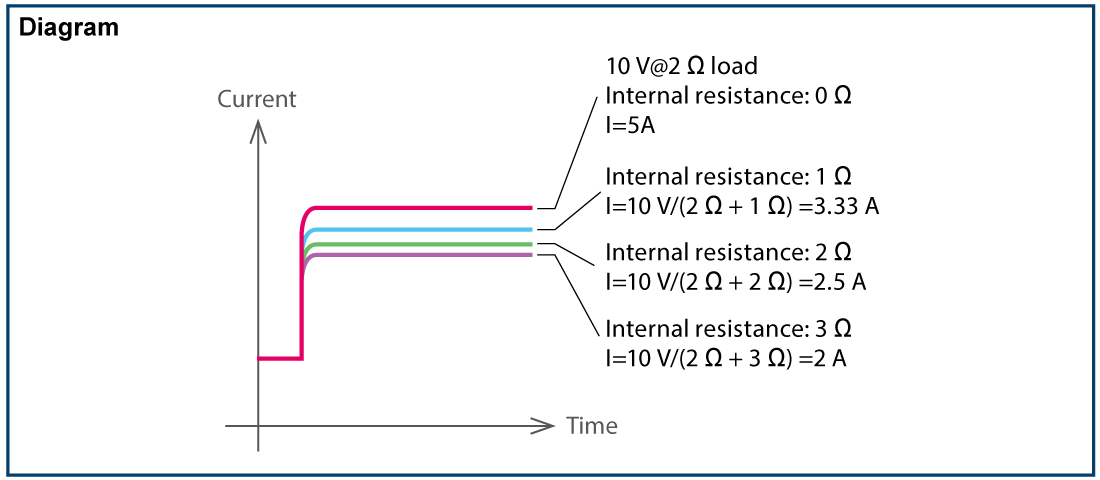
Variable Internal Resistance Function (in CV mode)
Set the internal resistance to any value to generate a voltage drop when the load current flows.
Batteries, photovoltaic cells, and fuel cells can be simulated.
(The setting range of the internal resistance value is from 0 Ω to the rated voltage/rated current.)
Preset Memory Function
The series comes with the preset memory function by which the preset values can be automatically saved at power off.
Additionally, the storage of up to three respective setting values of the output voltage/current/power is available.
Secure Analog remote control
The external analog remote control of voltage/current/power is isolated from the output of the power supply as standard.
When controlling/monitoring multiple power supplies, you can use the product more securely as the external analog input/output control has a chassis (ground) potential.
External Analog Remote Control
- External output ON/OFF
-
The output can be turned ON/OFF by the external relay or TTL signal. The logic of the signal can be selected by 5 V input.
- Remote sensing
-
It ensures the prevention of stability deterioration caused by the voltage drop (VO-VL) by the resistance (R) of the output wire and the contact resistance (up to 0.5 V).
- Remote/Local mode setting
-
Up to three modes selected from output voltage control, output current control, output power control, resistance, overvoltage protection, overcurrent protection, and overpower protection can be switched by relay or TTl signal.
- Status output
-
Flexible error detection function!
- Output monitor
-
(Voltage, Current)
- Output control
-
(Voltage, Current, Power, Resistance, Overvoltage protection, Overcurrent protection, Overpower protection)
Select only the functions you need! Prepare the lowest command voltage!
Up to three settings are selectable in voltage, current, power, resistance, OVP, OCP, and OPP.
Residual voltage detection LED
Use to check residual voltage
The LED on the rear panel blinks when there is voltage remaining on the DC input/output terminals in output or output off (power-on only).
It is useful as a reference to check if the voltage remains. Be sure to check the voltage before operating the unit.

Expandable to 150kW with Master-slave Control

Easy expansion of your choice up to 150kW
Within the same series, you can increase the power using the shared cable and parallel control cable (LAN cable).
Even if you want to change testing items or targets, you only have to add the necessary amount.
("Master-slave Control Cable", a Matsusada Precision original set of pre-processed share cable and parallel control cable is available.)
Two-mode Lock Function
The lock function is available with two modes: "Full" to lock all front panel operations and "Normal" to lock all operations except the ON/OFF switch.
With the "full" lock mode, all operations on the front panel are locked to prevent erroneous operations. Meanwhile, the "normal" lock mode can lock all operations except the ON/OFF switch in which the emergency stop is enabled. This provides a flexible and valuable safety measure tailored to the user's operational requirements.

Password Function New function
In this function, to cancel the two-mode lock function, input a 4-digit PIN code. (Enable/Disable is selectable.)

PBR-BT: Battery Charge/Discharge Software (sold separately) NEW
Designed for Intuitive Operation
To meet the demand for user-friendly interfaces, Matsusada Precision introduces dedicated battery charge/discharge software for the PBR/PBRM series. This software streamlines complex testing sequences with a clear, intuitive design.

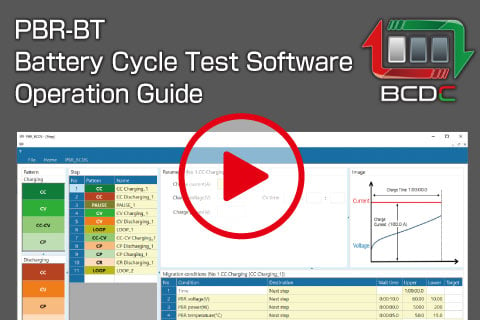
Battery Cycle Test Software Demo Video
The following video shows an image of its use.
Functions and Features
- Simple setting to complex charge/discharge sequences
-
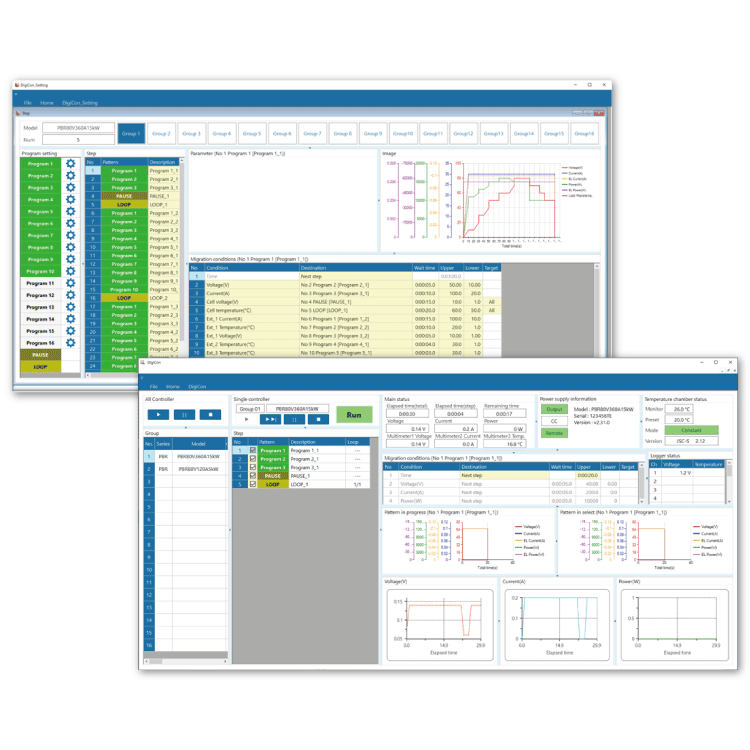
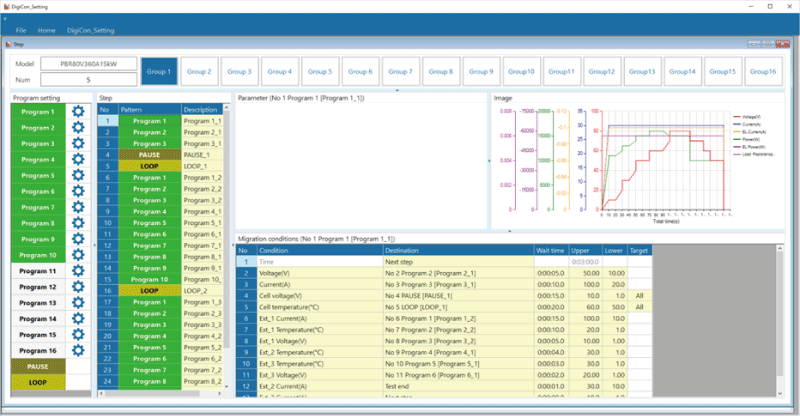
Dragging and dropping icons in the following modes for setting
 It provides an easy operation that enables even a novice in software development to create the software easily. Once creating a sequence initially, it can be saved and recalled almost unlimitedly (depending on the storage capacity of your computer) so that you can readily run various patterns of tests you have created.
*The setting app screen image
- Real-time monitoring of voltage and temperature of each cell
-
By connecting a data logger, the measurement and checking of the voltage and temperature of each cell are available in real time.
- Quick setting to enable/disable or skip steps
-
Select the checkbox so that you can immediately enable/disable the set sequence step.
It is available even during the operation, so you do not need to stop the output when you change the same sequence according to your needs.
In addition, the skip function allows you to end the current step and move to the next step by pressing the skip button on the software screen.
- High precision data management linked to measurement devices
-
The high-precision measurement is available with a multimeter instead of the PBR unit.
By connecting a multimeter, measurement data (voltage, current, power (calculated from voltage and current), and temperature) can be imported into our software for batch management.
Thanks to the features, high-performance data management is provided without the troublesome operation of collating the data. It was impossible up until now since conventional charge/discharge software could not be linked to external measuring instruments.
- Graph display of PBR/PBRM operation log data
-
Using MLV, Matsusada Precision's operation log display software, the sequence log data appears in the graph.
- Step transition condition in CSV format
-
Step transition conditions (transition time/transition condition/destination) can be created in CSV format.
- CSV output format for operation log data
-
The operation log data (output voltage/current/power/battery charge rate/elapsed time, etc.) can be output in CSV format.
As you have only to pick up the necessary information and edit it freely using spreadsheet software, etc., it contributes to reducing the time to create experiment reports, etc.
- Link with temperature chamber (coming soon)
-
By linking with a temperature chamber, you can set the execution temperature for each step at the sequence execution. There is no need to configure at the temperature chamber side, which can save the setup time for heat cycle tests, etc.
- CAN communication with BMC, BMS, and BMU
-
With a CAN conversion adapter for PC, you can check commands from BMC, BMS, and BMU via CAN communication as well as use them as the transition condition.
Multiple-use data logger (optional)
Multiple uses of data logger up to 120 channels in 8 units to have the cell voltage, cell temperature, etc. of the battery modules. (Up to 15 channels per unit available as standard equipment) The acquired data is saved and used for charge/discharge safety control, cell balancing as well as deterioration checking of batteries.
Specifications
- Input voltage
-
200 to 240 Vac, 50/60 Hz, Single-phase
200 to 240 Vac, 50/60 Hz, Three-phase
380 to 440 Vac, 50/60 Hz, Three-phase (Option) - Constant Voltage (CV) control
-
[Local] Rotary encoder on front panel
[Analog remote] External control voltage 0 to 10 Vdc
[Digital remote] Command - Constant Current (CC) control
-
[Local] Rotary encoder on front panel
[Analog remote] External control voltage 0 to 10 Vdc
[Digital remote] Command - Constant Power (CP) control
-
[Local] Rotary encoder on front panel
[Analog remote] External control voltage 0 to 10 Vdc
[Digital remote] Command
Option
- -LAsoc
-
SOC automated variable system
Refer to "SOC Automated Variable Function (Option)".
- -LCa
-
CAN interface port *
Using CAN communications, output controlling and operation status monitoring of these devices can be performed.
- -LGob
-
Optical interface port *
The unit is remotely controlled by isolating with optical communication. As complete isolation is provided by means of optical fiber, this enables advanced prevention of erroneous operation involved with transient phenomenon caused by surges, inductive lightning, external noise, etc.- -LGob: Optical interface port + optical cable 2 meters
- -LGob(Fc5): Optical interface port + optical cable 5 meters
- -LGob(Fc10): Optical interface port + optical cable 10 meters
- -LGob(Fc20): Optical interface port + optical cable 20 meters
- -LGob(Fc40): Optical interface port + optical cable 40 meters
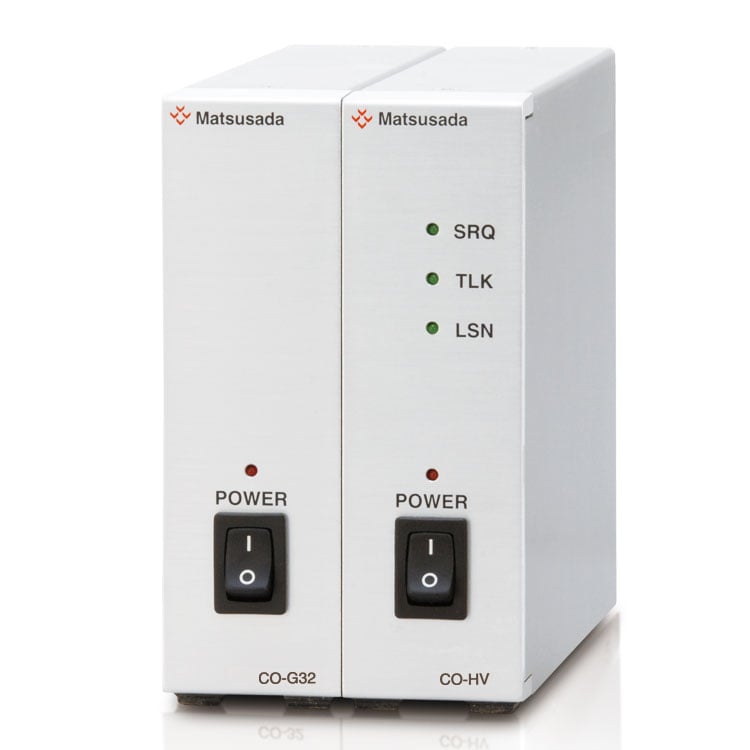
The optical communication adapter at the control side is sold separately.- for LAN: CO-E32
- for USB: USB-OPT
- for RS-232C: CO-OPT2-25, CO-OPT2-9
- for RS-485: CO-OPT4-25
- for GPIB: CO-G32 (Discontinued in December 2028)
- -LRs
-
RS-232C/RS-485 interface port *
Using RS-232C/RS-485 communications, output controlling and operation status monitoring of these devices can be performed.
- -L(400V)
-
System power supply rated voltage 380 Vac to 440 Vac
Models of 15kW are available with the system power supply rated voltage 380 Vac to 440 Vac, 3 x 30 A (@400V), three-phase, 50 Hz/60 Hz.
* The -LCa, -LGob, and -LRs options cannot be selected simultaneously.
How to order
When placing an order, please add the option code(s) after the model name. If adding two or more options, omit the “-L” from the second and subsequent option codes, and list them in alphabetical order, with the input voltage option placed at the end.
Example: PBR500V100A15kW-LGob(Fc10)(400V), PBR500V100A15kW-LAsocCa
ADDITIONAL ACCESSORIES
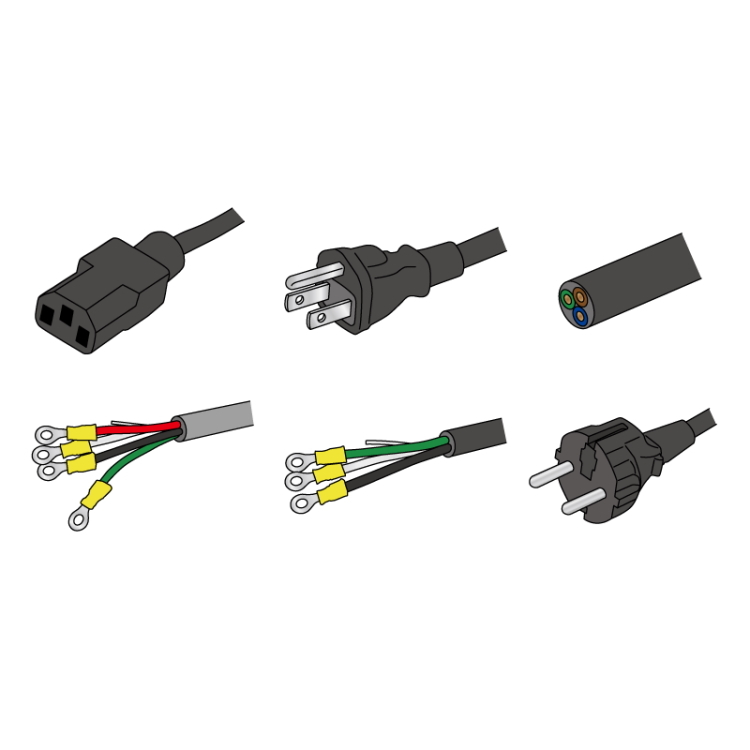
- AC Input Cables
-
Sold separately
Input terminal to be
installed by the customer.CABLE TYPE 14 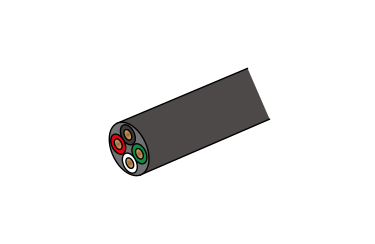
Power input end
Input plugRated voltage/current: 600 V/58 A Cable length: 10 meters
(Contact our sales representatives if you would like to extend the cable length.)Sold separately
Three-phaseCABLE TYPE 15 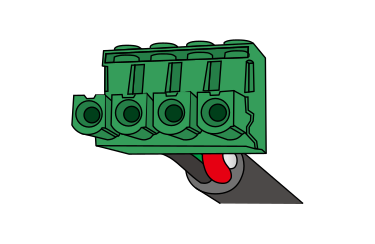
Power input end
Input plugSold separately
-L(400V) optionCABLE TYPE 16 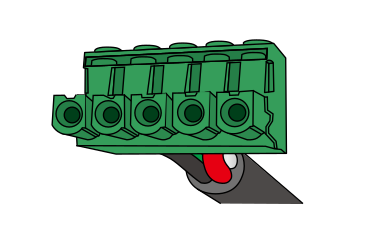
Power input end
Input plugSold separately
Single-phaseCABLE TYPE 17 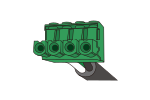 Power input end
 Input plug
Rated voltage/current:
600 V/33 A
*The maximum value with the single-phase type used in ambient temperature +40ºCCable length: 10 meters
- Master-slave control cables
-
This cable set includes a [share cable] (photo on the right) with the share terminals, and the [parallel control cable] (LAN cable). Please choose from the table below according to the number of parallel connection units.
Model name Units number Included in the set Share cable Parallel control cable PBR-MS2 cable 2 1.5 meters × 1 1.5 meters × 1 PBR-MS3 cable 3 3.0 meters × 1 1.5 meters × 2 PBR-MS4 cable 4 4.5 meters × 1 1.5 meters × 3 PBR-MS5 cable 5 6.0 meters × 1 1.5 meters × 4 PBR-MS6 cable 6 7.5 meters × 1 1.5 meters × 5 PBR-MS7 cable 7 9.0 meters × 1 1.5 meters × 6 PBR-MS8 cable 8 10.5 meters × 1 1.5 meters × 7 PBR-MS9 cable 9 12.0 meters × 1 1.5 meters × 8 PBR-MS10 cable 10 13.5 meters × 1 1.5 meters × 9 Example: The cable for connecting 3 PBR
<Example> PBR-MS2 cable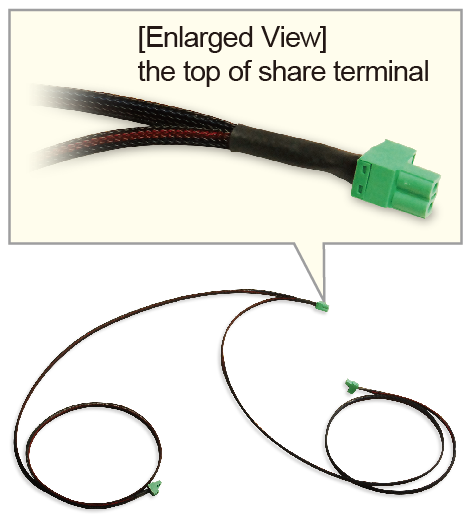
- Battery cycle test software
-
Model Name: PBR-BT
The advanced battery test and emulation software is designed for high-voltage battery simulations and charge/discharge tests.
For details, download the datasheet below.
- Application software
-
DigiCon-PBR: Remote control, Test workflow design, and Data logging
DigiCon is an application software that remotely controls Matsusada Precision's DC power supplies connected via LAN. The software can control multiple power supplies simultaneously or individually. -
For details, refer to "Remote Control Software".
- Power control for PRKT, PRT/PRTM, PBR/PBRM, P4KF, PKTS, HARS series
- Full remote control available
- Consists of "configuration software" and "operation software
- Linkage to digital multimeters, data loggers, and thermostatic chambers is possible.
- Easy operation with Graphical User Interface (GUI)
- Automatic Test Equipment (ATE) can be built without programming knowledge.
- Real-time logging, graphing, and data storage

How to order
The model name changes depending on the number of units. When ordering the product, put a number from 2 to 10 in #.
For example, "2" should be entered if you use the two PBR units in Master-slave control or "10" in using the ten units.
[Example] PBR-MS2 cable
Download
If you are unable to download a file
Please try the following solution.
- Please press Ctrl+F5 to clear the cache of your web browser and try again.
- Please restart your web browser and log in again to try again.
- Please change your web browser to another browser and try again.
- Restart the computer and try again.
- Please try again on a different computer.
-
PBR/PBRM series Datasheet
Date: 2025-11-18 rev 30
PDF (6,704 KB)
-
DC POWER SUPPLIES SELECTION GUIDE
Date: 2025-06-27 rev.02
PDF (5,265 KB)
-
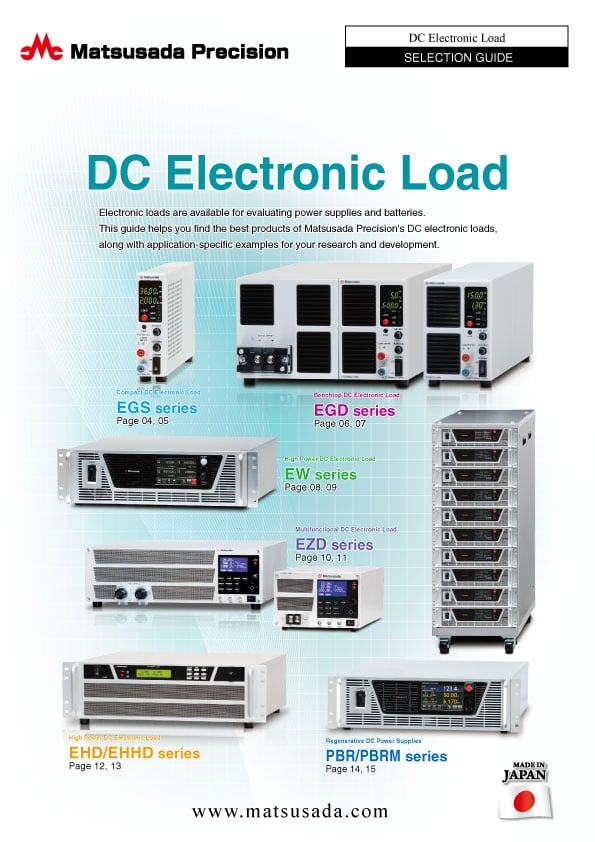
DC Electronic Load Selection Guide
Date: 2025-5-20 rev.05
PDF (5,477 KB)

-
How to Use DC Power Supplies
Date: 2025-11-11 rev 09
PDF (1,281 KB)
-
PBR series Basic Instruction Manual (Both Japanese and English)
Date: 2021-03-04 rev. 1.3
PDF (924 KB)
-
PBR series Instruction Manual
Date: 2025-12-04 rev 2.2
PDF (1,863 KB)
-
PBR Charge/Discharge Software Instruction Manual
Date: 2025-11-20 rev 1.3
PDF (1,315 KB)
-
Application package manual
Date: 2025-11-20 rev 2.4
PDF (2,067 KB)
-
DigiCon Instruction Manual
Date: 2025-03-25 rev 0.2
PDF (4,541 KB)
-
Command List (PRT, PRKT, PBR, PKTS series)
Date: 2025-03-19 rev 0.3
PDF (918 KB)

-
PBR series Outline Drawing (DXF, PDF)
Date: 2020-06-01
zip (2,078 KB)
Login Required
-
PBR/PBRM series Datasheet
Date: 2025-11-18 rev 30
PDF (6,704 KB)
-
DC POWER SUPPLIES SELECTION GUIDE
Date: 2025-06-27 rev.02
PDF (5,265 KB)
-
DC Electronic Load Selection Guide
Date: 2025-5-20 rev.05
PDF (5,477 KB)
-
How to Use DC Power Supplies
Date: 2025-11-11 rev 09
PDF (1,281 KB)
-
PBR series Basic Instruction Manual (Both Japanese and English)
Date: 2021-03-04 rev. 1.3
PDF (924 KB)
-
PBR series Instruction Manual
Date: 2025-12-04 rev 2.2
PDF (1,863 KB)
-
PBR Charge/Discharge Software Instruction Manual
Date: 2025-11-20 rev 1.3
PDF (1,315 KB)
-
Application package manual
Date: 2025-11-20 rev 2.4
PDF (2,067 KB)
-
DigiCon Instruction Manual
Date: 2025-03-25 rev 0.2
PDF (4,541 KB)
-
Command List (PRT, PRKT, PBR, PKTS series)
Date: 2025-03-19 rev 0.3
PDF (918 KB)
-
PBR series Outline Drawing (DXF, PDF)
Date: 2020-06-01
zip (2,078 KB)
On this website, we provide only the latest versions of information and instruction manuals for our products. Therefore, the newest versions of manuals on the website may differ from those that came with products you purchased in the past.