
Digital Function Generator
Digital Function Generator High-speed waveform output ideal for complex programming sequences
- Frequency range:
0.01 Hz to 1 MHz - Maximum amplitude:
20 Vp-p (@1kΩ = RL)
7.5 Vp-p (@50Ω = RL) - Easy handling
- Simple setting
Simple operation and high stability: The benefits of a digital function generator
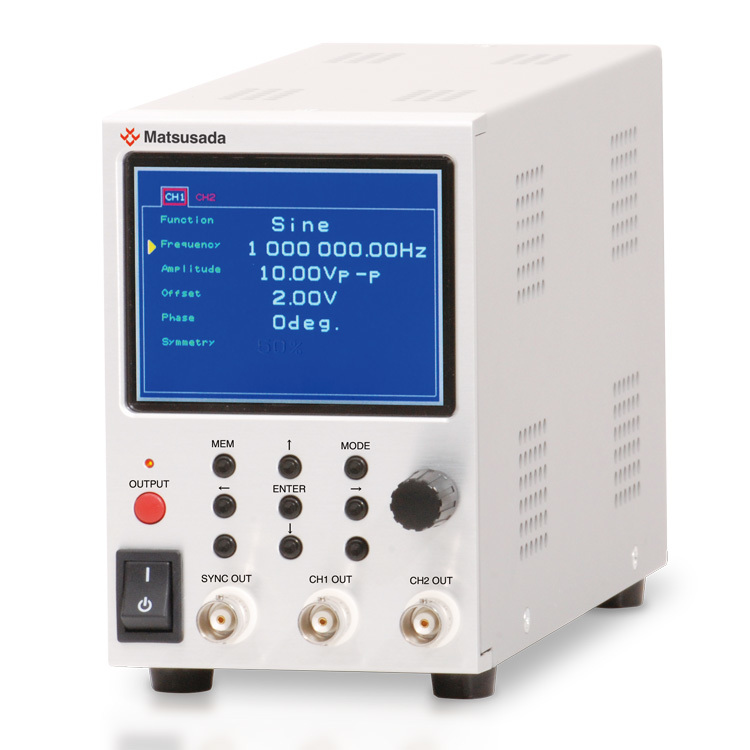
The eK-FGJ is a compact, user-friendly function generator designed for seamless integration with Matsusada Precision bipolar power supplies. It allows you to directly set the power supply's output voltage or current, eliminating the need for manual gain calculations. This ensures accurate, intuitive control and accelerates your testing workflow. Featuring a 3.5-inch LCD screen, the unit offers intuitive operation and generates highly accurate, stable waveforms suited for demanding applications.
Features
- Designed for directly setting the output from bipolar power supplies produced by Matsusada Precision.
- High accuracy and stability features for signal creation
- Intuitive operation and setting on LCD screen in a single unit
- Programming operation with control software
- Easy operating exclusive control software as standard equipment
Model
| Model | Frequency range | Number of channels | Maximum amplitude | Offset | Output impedance |
|---|---|---|---|---|---|
| eK-FGJ | 0.01 Hz to 1 MHz | 2 | 20 Vp-p (@1 k Ω = RL), 7.5 Vp-p (@50 Ω = RL) |
+ / -10 V (no load) | 50 Ω |
Functions
Direct Control of Bipolar Power Supplies
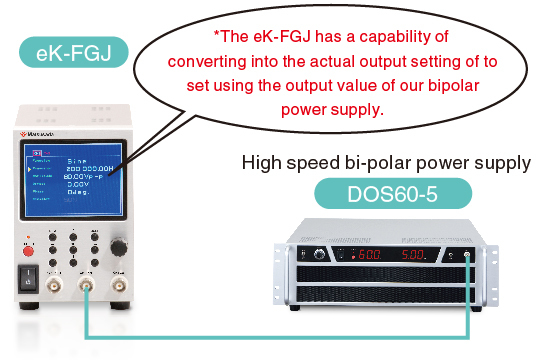
If a different output is used instead of DC, 0 V, and 0 A will be displayed since the unit is dedicated to displaying DC output in DOS series
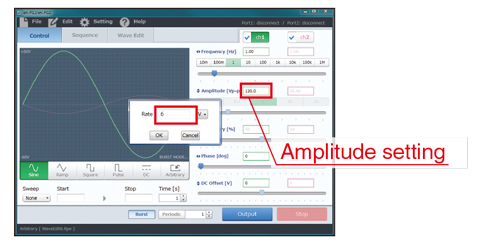
Output value from the function generator can be converted and set based on our bipolar power supplies.
Accordingly, eK-FGJ features an accurate and intuitive setting without calculating with the gain value.
Dual-Channel Synchronous Waveform Output
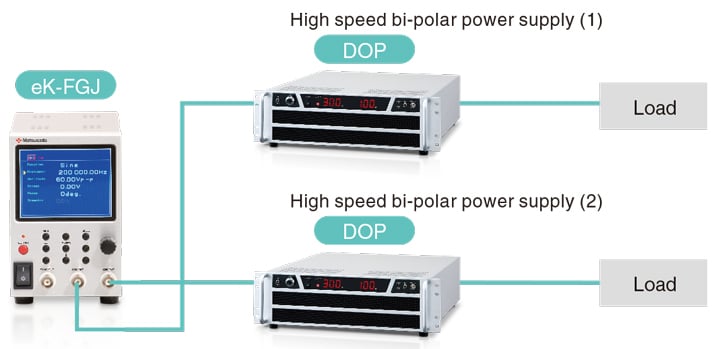
Reverse-phase synchronous output for motor and dielectric driving By driving two power supplies in reverse phase (positive and negative), the system can effectively drive motors or test dielectric materials.
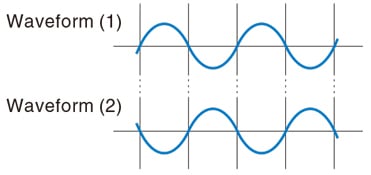
Synchronized 2-Channel Control The series provides synchronized 2-channel outputs. Both channels can share the same waveform, cycle, and sweep start point. Additionally, a precise phase shift can be applied between the two channels.
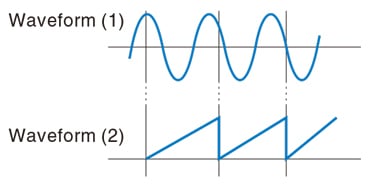
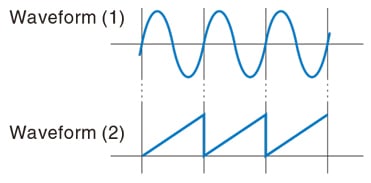
Controls two waveforms by synchronizing their cycles and sweep start points.
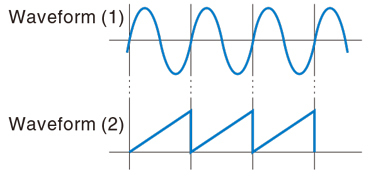
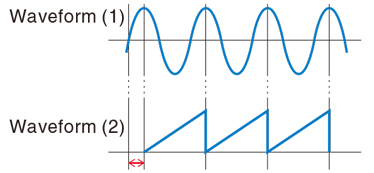
Adjusts the output timing by setting a precise phase difference between channels.
Functions
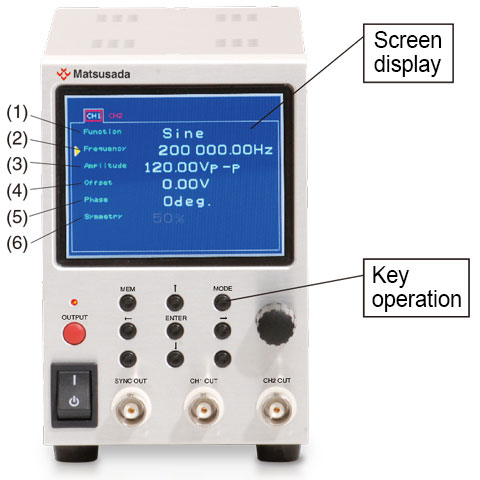
Screen Display
- Function: output waveform selecting (among the waveform items referring to "GENERAL SPECIFICATIONS")
- Frequency: frequency setting/setting value displaying
- Amplitude: amplitude setting/setting value displaying
- Offset: DC offsetting/setting value displaying
- Phase: setting of phase to start/setting value displaying
- Symmetry: symmetry setting/setting value displaying (in selecting triangle wave and square wave)
Key Operation
- MEM: memory writing/read screen displaying
- MODE: display switching/setting screen displaying
- ← ↑ ↓ →: cursor movement
- ENTER: to confirm your setting on the memory screen
Specifications
- Input voltage
- 85 to 265 Vac, 50/60 Hz, Single-phase
Software
Intuitive Control Software Included
The eK-FG2 comes with dedicated control software that enables programmable operation and complex waveform generation.
Sequence Function
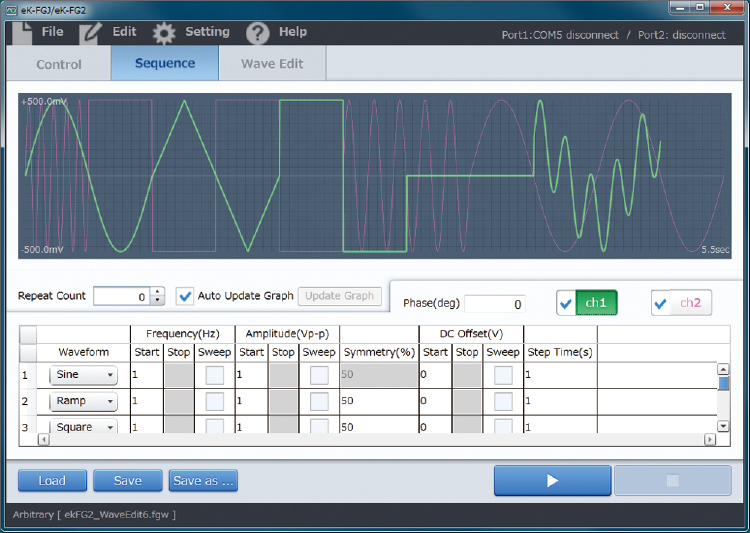
Independent sequencing is available for both Ch1 and Ch2. Users can program specific output patterns or utilize custom waveforms created in the dedicated editor.
Optional Waveform Generation
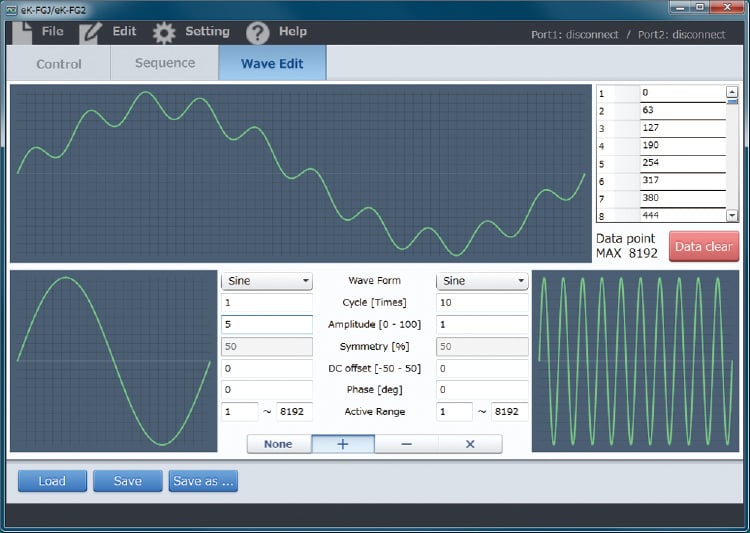
Arbitrary Waveform Generation: Create complex waveforms effortlessly by combining base waves (e.g., sine, square) using mathematical functions (add, subtract, multiply).
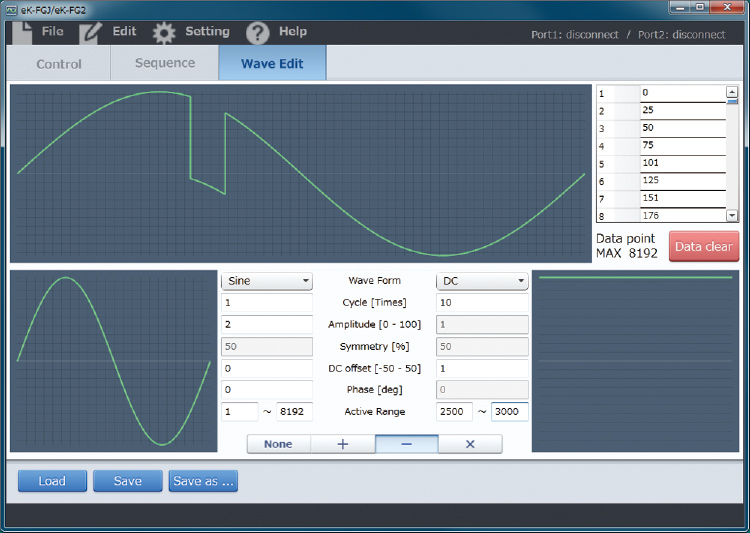
Flexible Composition: Define specific ranges for waveform modification.
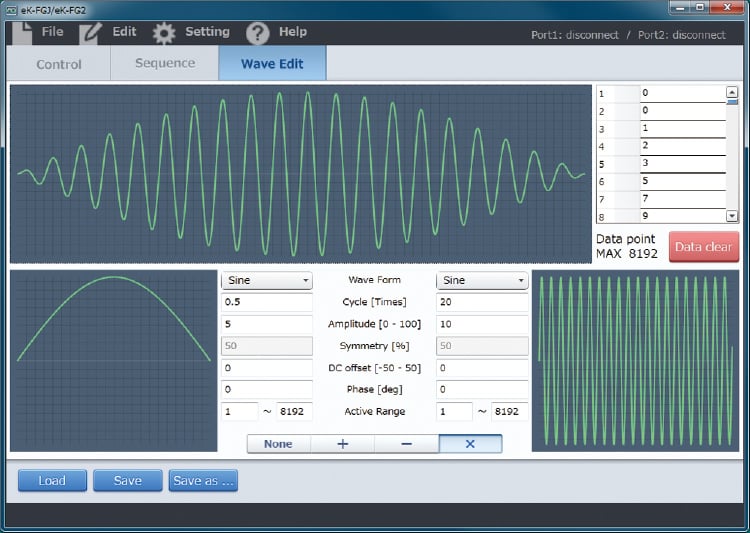
Arithmetic Operations: Combine waveforms to generate positive or negative outputs tailored to your application requirements.
(Note: Reproduced waveforms in the software may slightly differ from the actual physical output depending on load conditions.)
Options
- Optical Interface Port Option
-
Isolation control is performed by optical communication. The optical interface option provides complete electrical isolation via a fiber optic cable. This prevents measurement errors and malfunctions caused by surges, induced lightning, and other external noise. (can be produced with the control software).
Important Note on Optical Interface Response Time
The optical interface option (-LGob) provides superior noise immunity but may introduce a communication delay before the start of sequence operations or arbitrary waveform output. This option is not recommended for applications requiring immediate response or high-speed synchronization between the command and output.- -LGob: Optical interface port + optical cable 2 meters
- -LGob (Fc5): Optical interface port + optical cable 5 meters
- -LGob (Fc10): Optical interface port + optical cable 10 meters
- -LGob (Fc20): Optical interface port + optical cable 20 meters
- -LGob (Fc40): Optical interface port + optical cable 40 meters
Select the optional optical interface port (-LGob) when using this DC power supply under the following conditions.
- Noisy environments such as factories (example: when motors or coils are used near loads or power sources).
- If this power supply and your controller (PC or PLC) cannot be installed within 2 meters.
- When there is a possibility of arcing or output short-circuit.
When this option is selected, a standard USB port will not be installed.
How to Order
When ordering, add Option No. in the following order to Model No.
<Example> eK-FGJ-How to order LGob, eK-FGJ-LGob(Fc5)
Dimensions
Download
If you are unable to download a file
Please try the following solution.
- Please press Ctrl+F5 to clear the cache of your web browser and try again.
- Please restart your web browser and log in again to try again.
- Please change your web browser to another browser and try again.
- Restart the computer and try again.
- Please try again on a different computer.

-
eK-FGJ/eK-FG2 Datasheet
Date: 2025-11-17 rev 06
PDF (2,132 KB)

-
eK-FGJ Instruction Manual
Date: 2020-09-10 rev0.0
PDF (887 KB)
-
eK-FGJ/eK-FG2 Control Software Instruction Manual
Date: 2020-10-14 rev0.9
PDF (2,158 KB)
-
USB driver for Windows 10, 11
Date: 2025-12-19 rev 2.12.36.20
ZIP(1,629KB)
-
USB driver for Windows XP, 7, 8, 8.1
Date: 2025-01-22 rev 1.7.6
ZIP (6,504 KB)
Login Required
-
eK-FGJ/eK-FG2 Datasheet
Date: 2025-11-17 rev 06
PDF (2,132 KB)
-
eK-FGJ Instruction Manual
Date: 2020-09-10 rev0.0
PDF (887 KB)
-
eK-FGJ/eK-FG2 Control Software Instruction Manual
Date: 2020-10-14 rev0.9
PDF (2,158 KB)
-
USB driver for Windows 10, 11
Date: 2025-12-19 rev 2.12.36.20
ZIP(1,629KB)
-
USB driver for Windows XP, 7, 8, 8.1
Date: 2025-01-22 rev 1.7.6
ZIP (6,504 KB)
On this website, we provide only the latest versions of information and instruction manuals for our products. Therefore, the newest versions of manuals on the website may differ from those that came with products you purchased in the past.